


In short
A project intake process is the system an agency uses to capture, review, and assign incoming client requests before work begins. It typically involves five steps: capturing the request, reviewing and prioritizing it, checking it against the agreed scope, assigning an owner and due date, and confirming the details with the client.
The goal is simple: every request should have a clear owner, an agreed timeline, and a defined next step.
Client requests rarely arrive in one place. A client might send an email, follow up through Slack, and mention another requirement during a meeting. Without a defined process, requests can be missed, duplicated, or left unassigned until the client follows up.
A project intake process gives agencies a consistent way to capture, review, and assign incoming requests before work begins.
This guide covers the five essential steps, the information to include in a project intake form, a practical example, and ways to manage requests across different communication channels.
What is a project intake process?
A project intake process is a structured way of turning incoming work requests into approved and assigned tasks. It defines how requests are submitted, who reviews them, how they are checked against the agreed scope, and how each one is assigned an owner and due date. In larger organizations, a project management office (PMO) may manage intake and evaluate which new projects should receive funding and resources. Agencies typically handle a different kind of intake. Most requests come from existing clients and fall within an ongoing engagement. These could include a revised banner, an additional blog post, a landing page update, or a change to a monthly report. Regardless of the request, your intake process should answer three important questions:
- Is the request within the agreed scope?
- Who is responsible for handling it?
- When should the work be completed?
Project intake process vs. project intake form
A project intake form is one part of the overall process. It collects the information needed to understand a request, while the intake process defines what happens after submission, including review, scope checks, assignment, and client confirmation.
Having a form doesn't automatically mean you have an effective intake process. Without clear steps for reviewing and assigning submissions, requests can still get lost or remain unattended.
Project intake vs. client intake
Client intake takes place at the beginning of a client relationship. It involves qualifying a prospect before signing a contract and collecting important information such as brand assets, account access, and business goals during onboarding.
Project intake begins once the engagement is underway. It deals with the ongoing requests a client makes throughout the relationship, ensuring that each one is reviewed, assigned, and tracked.
Why agencies need a project intake process
Agency teams rarely receive all their requests through a single channel. A client might email the account lead, message a designer directly on Slack, and bring up another requirement during a weekly call. When these requests are handled separately, important details can get overlooked. A consistent project intake process ensures that every request follows the same path, regardless of where it originates. Here are some of the key benefits:
- Fewer dropped requests: Every incoming request is recorded and assigned to someone responsible for following it through, rather than relying on team members to remember it.
- Protected profit margins: Reviewing requests against the statement of work (SOW) helps identify additional work before the team starts on it. This reduces the chances of delivering work outside the agreed engagement without approval.
- More realistic workloads: Team leads get better visibility into incoming work, making it easier to assess capacity and distribute tasks across the team.
- Faster client responses: Clients receive confirmation about who is handling their request and when they can expect an update or deliverable. This also reduces unnecessary follow-up messages.
- A clear record of requests: When a client asks for an update, your team can quickly check when the request was received, who was assigned to it, and what stage it has reached.
Project intake process steps
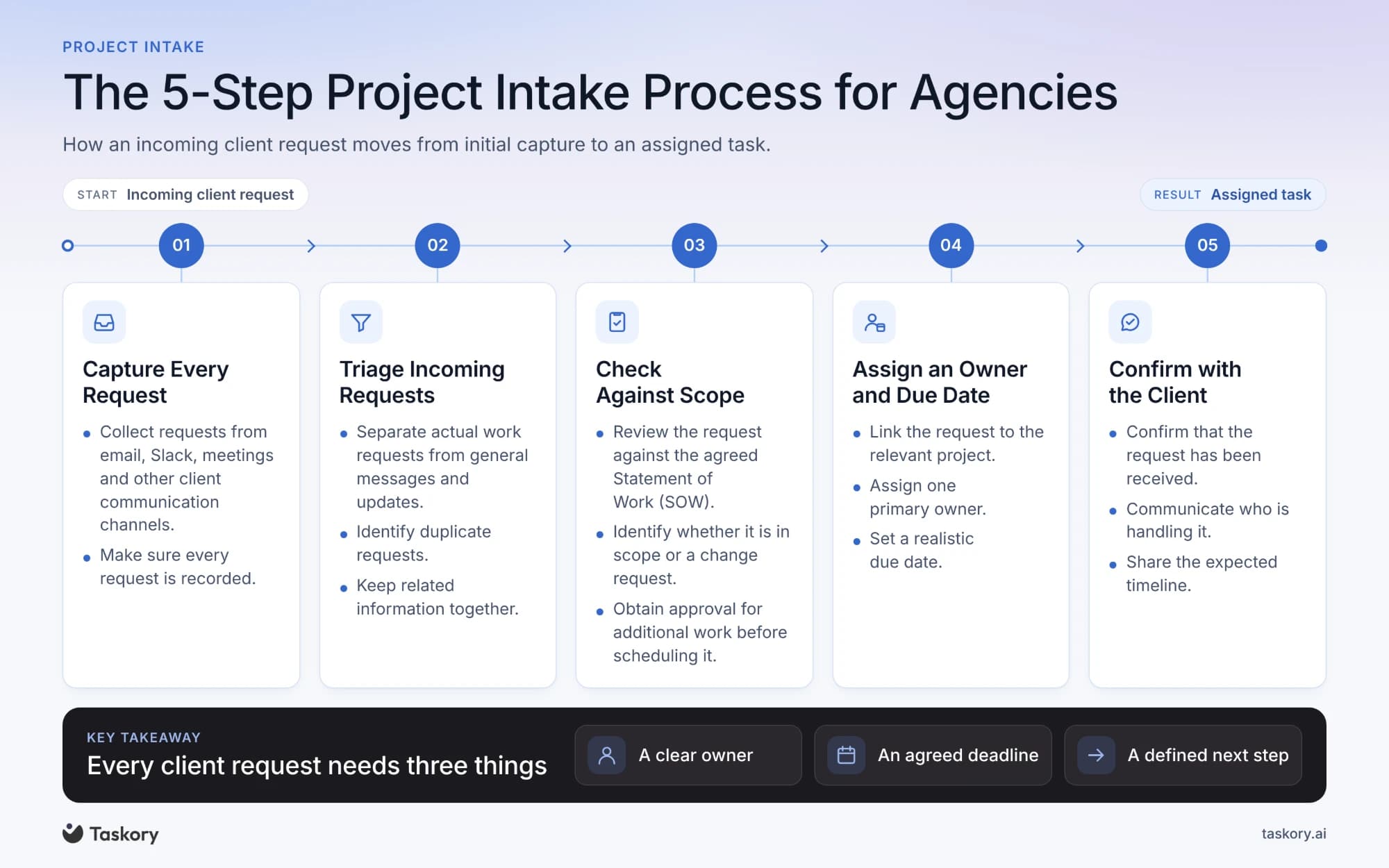
Most agency project intake processes follow five essential steps. The important thing is to make sure the process covers the communication channels your clients actually use, rather than relying only on a formal request form.
Step 1: Capture every request
The first step is to record every incoming client request, regardless of where it was shared. Requests can arrive through email, Slack, phone calls, comments on shared documents, or even WhatsApp.
If a client has asked your team to do something, it should be recorded as a request, even if nobody has formally documented it yet.
Start by identifying the communication channels each client uses to contact your team. Then assign someone to monitor each channel and decide how frequently those checks should happen.
If a client regularly sends requests through a channel your team doesn't monitor, either assign someone to check it or agree on another communication channel with the client.
The objective is to make sure that no request gets overlooked simply because it arrived somewhere unexpected.
Step 2: Triage incoming requests
Once requests have been captured, the next step is to review and organize them. This is where your team separates actual work requests from other messages, such as general updates, thank-you notes, approvals, and shared files.
Triage also helps identify duplicate requests. For example, a client might send an email asking for a design revision and then mention the same requirement during a call.
Duplicate requests can create confusion by resulting in multiple tasks for the same piece of work or assigning the work to different team members.
When the same request appears in multiple places, create one task and attach the related messages or references to it. This keeps the relevant information together and gives the team a single place to track progress.
Step 3: Check the request against scope
Before scheduling any work, check whether the request falls within the client's agreed statement of work (SOW).
If the request is covered by the existing agreement, it can move forward to the assignment stage. If it falls outside the agreed scope, treat it as a change request. The additional work should be priced and approved in writing before it is scheduled.
A clearly documented SOW makes these checks easier. It should define the agreed deliverables, responsibilities, and any relevant limits on the work included in the engagement.
It's also worth establishing clear guidelines for handling smaller requests. Without predefined limits, account leads may have to negotiate the scope of every minor revision.
One approach is to introduce an agreed time threshold. For example, requests requiring less than one hour of work could be absorbed into the existing engagement and logged, while anything larger would be treated as a change request.
The exact threshold will depend on your agency's pricing model and client agreements.
Step 4: Assign an owner and a due date
Once a request has passed the scope check, it needs to be assigned properly. A request should only be considered assigned when it has been linked to the relevant project, given a clearly defined owner, and assigned a due date.
Each request should have one primary owner, even if several people contribute to completing it. The owner is responsible for coordinating the work and ensuring that the final deliverable reaches the client.
Other team members can be assigned supporting tasks or subtasks, but accountability for the overall request should remain clear.
If a request needs to be handled by a particular department, route it to the department lead, who can assign it to the appropriate team member.
This approach helps avoid confusion about responsibilities and makes it easier to track who is accountable for completing each request.
Step 5: Confirm with the client
The final step is to close the loop with the client. Once a request has been reviewed and assigned, let the client know that it has been received, who is handling it, and when they can expect it.
A brief confirmation is usually enough to reassure the client that their request is being handled and give them a clear expectation of the timeline.
If the request falls outside the agreed scope, use this communication to explain the additional work and share the change request for approval.
Once the work is underway, regular progress updates can be included in your usual client reporting process.
What to include in a project intake form
A project intake form collects the information your team needs to understand, review, and assign an incoming request.
Ideally, clients should submit requests through this form. However, agencies know that not every client will follow that process. Some will continue sending requests through email, Slack, or meetings.
In those situations, the form can also serve as an internal checklist for account leads. If an incoming request is missing important information, the team can use the form to identify what needs to be clarified before assigning the work.
Essential fields in a project intake form
Field
Requester
What to ask
Who is submitting the request?
Why it matters
Identifies the person your team should contact for clarification and confirmation.
Field
Client account
What to ask
Which client or project is this request for?
Why it matters
Connects the request to the correct engagement, SOW, and budget.
Field
Request
What to ask
What do you need? Describe it in one sentence.
Why it matters
Helps the team understand the expected deliverable.
Field
Goal
What to ask
What is the purpose of this request?
Why it matters
Provides context and helps the team suggest a better approach when needed.
Field
Deadline
What to ask
When do you need it? Is the date fixed?
Why it matters
Helps the team distinguish firm deadlines from preferred timelines.
Field
Files and links
What to ask
Are there any reference files, links, or access details?
Why it matters
Ensures the team has the necessary resources before starting work.
Field
Approver
What to ask
Who will review and approve the final work?
Why it matters
Helps avoid unnecessary delays during the feedback and approval process.
Field
Scope check
What to ask
Is this request covered by the SOW? (Completed by your team.)
Why it matters
Helps identify additional work before it is scheduled.
| Field | What to ask | Why it matters |
|---|---|---|
| Requester | Who is submitting the request? | Identifies the person your team should contact for clarification and confirmation. |
| Client account | Which client or project is this request for? | Connects the request to the correct engagement, SOW, and budget. |
| Request | What do you need? Describe it in one sentence. | Helps the team understand the expected deliverable. |
| Goal | What is the purpose of this request? | Provides context and helps the team suggest a better approach when needed. |
| Deadline | When do you need it? Is the date fixed? | Helps the team distinguish firm deadlines from preferred timelines. |
| Files and links | Are there any reference files, links, or access details? | Ensures the team has the necessary resources before starting work. |
| Approver | Who will review and approve the final work? | Helps avoid unnecessary delays during the feedback and approval process. |
| Scope check | Is this request covered by the SOW? (Completed by your team.) | Helps identify additional work before it is scheduled. |
Project intake form template
You can copy the following template into a form tool, shared document, or project management platform. It can be used as a client-facing project request form or as an internal checklist for requests received through other communication channels.
Project request form (for the client)
- Your name and role
- Client or brand name
- What do you need? (Describe the request in one sentence.)
- What is the purpose of this request? (Goal or campaign.)
- When do you need it? Is the date fixed?
- Links to relevant files, references, or access details.
- Who will approve the work on your side?
- Is there anything else we should know?
Internal fields (completed by your team)
- In scope or change request
- Relevant project
- Assigned owner
- Due date
Keep the form short and easy to complete, especially on mobile devices. If a field rarely affects how your team reviews or handles a request, consider removing it.
Project intake process example
Here's an illustrative example of how a request moves through all five steps at a 15-person marketing agency.
- Capture: On Tuesday, a client's marketing manager emails the account lead requesting three LinkedIn ad variations for an upcoming webinar. Later that afternoon, she shares the same request in the agency's Slack channel.
- Triage: The account lead notices that the email and Slack message refer to the same requirement. Instead of creating two separate tasks, she records the request once and attaches both messages for reference.
- Scope check: The client's retainer covers four paid social creatives per month, and two have already been used. The three additional variations would exceed the agreed allowance by one. The account lead therefore identifies the third variation as a change request.
- Assign: The request is added to the client's paid social project, with the designer assigned as the primary owner and Friday set as the due date. The copywriter receives a separate subtask for preparing the ad copy.
- Confirm: The account lead responds to the client's email, confirming that the designer has received the request. She also explains that two variations are covered by the retainer, while the third requires approval as additional work. The expected delivery date for the drafts is Friday.
The client approves the additional variation later that day. Because the request was recorded in one place, it wasn't lost between the email and Slack conversation. The additional work was also agreed upon before the team started working on it.
This example shows how a consistent intake process can help agencies manage incoming requests while keeping responsibilities, timelines, and client expectations clear.
How to manage project intake from Slack, email, and meetings
For most agencies, a project intake form only captures a portion of incoming requests. Clients continue using the communication channels they are already comfortable with, which is often where the intake process starts to break down.
If you're managing intake manually, assign one person to monitor the communication channels associated with each client account. This person should review incoming messages at scheduled intervals, record relevant requests, assign an owner and due date, and confirm the details with the client.
This approach can work well when an agency manages only a few client accounts. However, as the number of clients and communication channels increases, the time required to monitor everything also grows.
During busy periods, teams may overlook these regular checks, increasing the chances of missing important requests.
How Taskory supports project intake
Taskory is designed to help agencies bring information from the tools they already use into one place. Its live integrations include Slack, Gmail, Outlook, Google Drive, OneDrive, Notion, and Monday.com. You can review the Taskory integrations page for more information.
When connected, these tools give teams a shared view of relevant client conversations, files, and work context. Taskory can help teams identify commitments in that information and turn them into tasks, so requests don't have to be manually recreated from every conversation. The team still needs to review each request and decide how it should be handled. For example:
- Review the request: Check the available context and confirm what the client is asking for.
- Check the scope: Compare the request with the agreed SOW and identify any additional work.
- Decide ownership: Choose the right person to coordinate and complete the request.
- Set the timeline: Confirm a realistic due date before work begins.
Taskory helps organize information and manage incoming work, but it doesn't make decisions about the client's agreed scope. Your team remains responsible for checking the SOW, approving additional work, and deciding who should handle each request.
For a closer look at managing requests that arrive by email, read our guide to email-to-task automation.
Project intake best practices for agencies
A well-defined process is a good starting point, but it also needs to be followed consistently. These best practices can help your agency manage incoming requests more effectively as your client base grows.
1. Assign an owner to every intake channel
Shared inboxes and client Slack channels are common places for requests to go unanswered. This often happens because multiple team members assume someone else has already picked up the request.
Assign one person to monitor each channel and designate a backup for periods when that person is unavailable. This creates clear responsibility for capturing incoming requests.
2. Don't consider a task assigned without a due date
Assigning an owner is important, but it doesn't provide a complete picture of when the work should be finished.
Even when a task has an assigned owner, the absence of a clear due date can make it difficult to track progress and ensure timely completion.
Make the due date a required field in your intake process so that every assigned request has a clear completion timeline.
3. Turn meeting requests into tasks before the call ends
Requests discussed during meetings are easy to overlook, especially when everyone assumes that someone else will document them.
Before ending a client call, review the requests discussed and confirm an owner and expected date for each one. Once the meeting notes are available, process those requests through the same intake workflow used for email and Slack.
For more on capturing and organizing meeting actions, see our guide to meeting-to-task automation.
4. Log out-of-scope work, even when you decide to absorb it
Not every small additional request needs to become a paid change request. Sometimes, your agency may decide to absorb the extra work to maintain a good client relationship.
However, it's still important to record these requests. Keeping track of additional work gives your team a better understanding of which clients regularly request more than their retainer covers.
This information can also support future contract renewals and pricing discussions.
5. Review your intake process every quarter
Your intake process should evolve as your agency grows. Reviewing it every quarter can help identify where requests are coming from, how long they take to get assigned, and how frequently additional work becomes a change request.
Use these insights to identify communication channels that need more attention and decide whether your existing scope thresholds are still appropriate.
If certain parts of the process involve repetitive manual work, our guide to agency workflow automation explains what you can consider automating first.
How to build your project intake process
Setting up a project intake process doesn't require new software or a complicated workflow. You can start with a single client account and gradually introduce the process across your agency.
Begin by identifying the channels through which that client sends requests. Assign someone to monitor those channels and establish a simple rule: every request must be linked to a project, assigned an owner, and given a due date before work begins.
Follow this process for two weeks and review the requests your team has received. Look at where they came from, how quickly they were assigned, and whether any were missed or delayed.
This review will help you identify where your intake process needs improvement, whether the problem is capturing requests, checking scope, or following up with clients.
For a broader approach to managing multiple accounts and their ongoing requirements, explore our guide to client project management.
If managing requests across email, Slack, and other connected tools is becoming difficult, Taskory can help bring relevant information into one place and turn client commitments into actionable work.
FAQ
Frequently asked questions
A project intake process usually follows five steps: capture the request, review and prioritize it, check it against the agreed scope, assign an owner and due date, and confirm the details with the requester. Larger organizations may also include a scoring or approval stage when evaluating new projects.
A project intake form collects the information needed to review and assign an incoming request. It typically asks who is requesting the work, what they need, why they need it, when it is due, which files or resources are involved, and who will approve the final work.
Project intake determines whether a request should move forward and who will be responsible for it. Project initiation takes place after that decision and involves planning the work, establishing timelines, and preparing the team to begin execution.
The operations or delivery lead usually owns the overall intake process, including the rules, request form, and scope thresholds. For individual client accounts, one person, often the account lead or project manager, should be responsible for monitoring communication channels and ensuring every request is properly assigned.
Urgent requests should still follow the intake process, although they may need to be reviewed and assigned more quickly. Establish clear guidelines in advance that define what qualifies as urgent, who can approve priority changes, and how quickly the request must be assigned. This prevents urgency from becoming a reason to skip important steps, such as checking the agreed scope.
Out-of-scope requests should still be recorded through the intake process, but they should be treated as change requests rather than immediately becoming assigned tasks. The additional work should be priced, approved by the client in writing, and scheduled only after approval. Recording these requests also helps agencies identify clients who regularly require work beyond their agreed retainer.

Keep reading
Related



Create account
One live record for every client, shared with your team.
Free to start, no credit card.